

Alexander Grabovetskiy, woodcarver, School of Woodcarving · Published 2020
What does unfortunately mean when a wood carver says it?
Quick answer: Unfortunately is my word for something the camera does not show you. In Venice Room 31.4 I said it about the overall movement, then tried to show it from one angle. Other lessons use it for a tool nobody makes anymore and for a cut that went too deep.
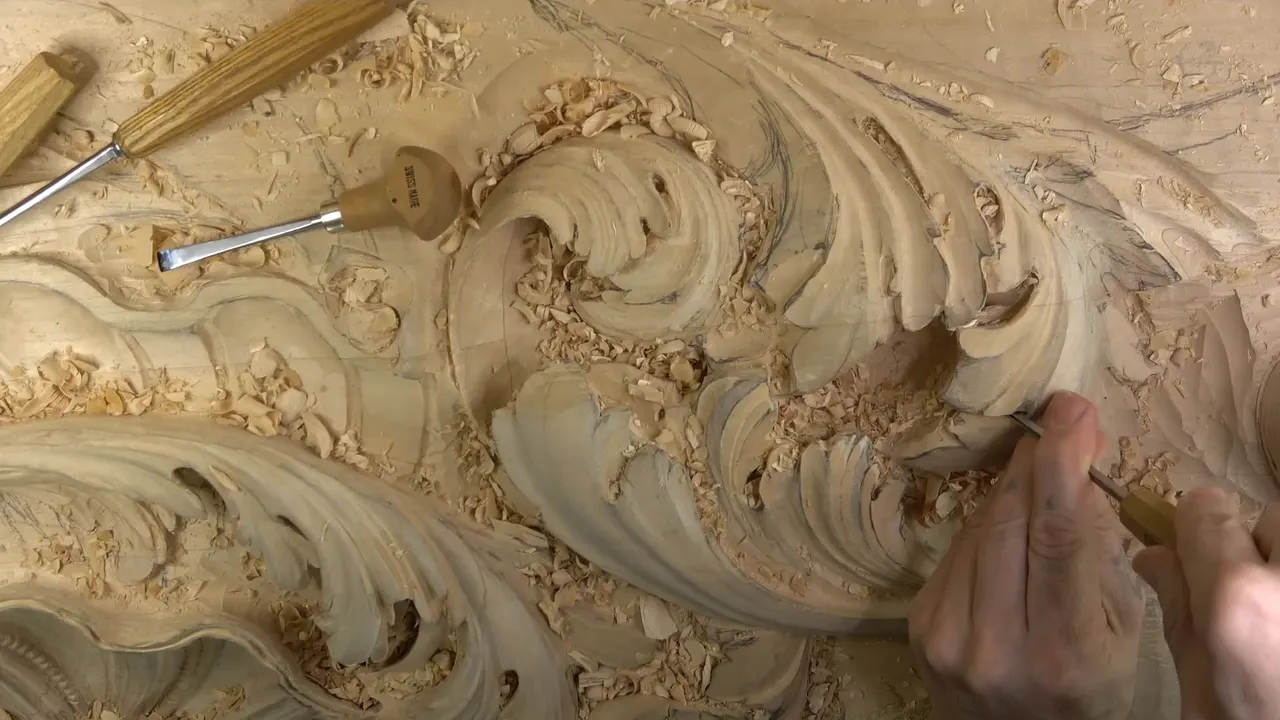
When I say unfortunately on camera, I am telling you that something is happening in the wood that your screen does not show. Venice Room part 31.4 has it about the overall movement of the carving, and right after it I tried to show that movement again. My other lessons use the same word for a tool nobody makes anymore, for a cut that went too deep, and for what a class in person has no time for.
Ever hear me say "you don't see it" and feel that the best part got skipped? Wondering what I was looking at is fair. Follow one word of mine through my wood carving lessons, and each time you will see what it points at and what I did about it.

What does unfortunately mean in wood carving?
For me it is a small apology with a fact inside it. The angle, the shape of the piece or my own hands hide something from the camera. After that I do one of a few things. Sometimes I show it again. Sometimes I promise a picture for later, shift the camera, or carry on and tell you my plan. The rest of this page is the proof, line by line, starting with the part this page belongs to.
What did I say in Venice Room 31.4?
Part 31.4 is a short video from workshop 31 of the Venice Room course, workshops 26 to 37. It opens on a number 11 gouge of 1 mm (about 1/25 in). "I can get with the number 11, one millimeter, and get rid of it," I said. A few seconds later came "That is good."
Next I held back. "I really don't need to round that more this way. I could little bit, but not much." Too much was not what I wanted, and I called that the main shape. For the next tool I said I should use "probably just number seven or so. Seven or eight." That was a plan, and no cue tells me which one I took.

One spot nobody will look at came after that. "I'm not going to go too deep," I said. That place is "never visible from any point of view," and it needed only a little cleaning, with no "too weak of a detail right there." So the plan was the number 11 and maybe 7 mm (about 9/32 in), to clean inside. After the cleaning I said, "That is probably plenty. Both ways, actually."
Tool marks were the next job. "Maybe with the bigger one, even number nine," I said, "get rid of those tool marks." At 4:17 came "enough, at least for now." Right after it, the word. "Now I need to, again, unfortunately, you don't see overall movement."

I did not leave it there. "Let me try to show you again, just to remind you from this point of view." Then I walked the line out loud: "From all the way, go up, I mean, down, and then go up like that. Okay? End up at this point." The word "again" matters, since part 31.3 has the same trouble. Over there it was almost impossible for me to see, I was moving blindly so I would not cover the camera, and I called that one of the challenges I have to deal with.
The work turned to detail now. "I don't have to, by the way," I said about creating more details, "but I still think it's going to look better." A concave came next. "Not really deep," I said, and called it a shallow concave. One idea I floated was almost no concave on one side and a more pronounced one on the other.

The gouge was a number 11. "That's what I'm using." Blending that in nicer was a maybe, I said later, and so was a slightly more pronounced concave right there, "just a little more movement." A check followed, "Let me double-check," and then I said that was good.
Two jobs I put off, and I said so. "I still have a division to make on the inside right here, but I can concentrate on it little later." Where an area meets a detail that was almost done, I said, "I've got so much mess going on inside. But I can also do it a little later. It's just all about cleaning." Last on my list was the edge, "just work on this edge a little bit," and then it would be more or less done.

Which cuts does the camera hide from you?
Many of them. Workshop 82 has it twice in part 4. First I needed a smaller tool, maybe 2 mm (about 5/64 in) or even 1.5 mm (just under 1/16 in). Then: "Unfortunately, you really don't see what is going on, but I'll try to make a good picture later on." Sharpening was next on my mind. Further along came "you don't see that close enough." Bringing my camera closer would put my head in the camera, I said, and then "I have to break all the rules."
Part 82.1 of that workshop has a spot I called a beautiful detail. I said you don't see as good how it looks, "but I'll show you a little later, maybe a different angle."

Over in workshop 84, part 2, I told you some stuff would go in another direction, and again I said the word. Was a new camera position the answer? "Maybe I'll just change the position of the camera." The cost is time. "For me, it's a really slow process," I said, because moving the camera makes me start "losing so much time."
Part 84.5 had the word riding on a plan. "I'm going to leave approximately quarter inch for the below movement" (1/4 in is about 6 mm). I said the word again about a spot you cannot see, and added "that's my plan."

Workshop 89, part 11, has it twice in under half a minute. First I talked about getting inside an area with a grounding tool, "which unfortunately you don't see." After a channel cut came the second one. "I can't change the position. It just takes so much time," I said. Then: "Just get an idea."

Workshop 54, part 8, had a cut going to go all the way underneath a separation, and "it's hard to see on the camera." Careful work was the plan, with my skew chisel. Part 55.1 has another division going underneath. The camera misses it, "but in real life, it's still going to be visible."

Workshop 59, part 8, has me saying I could probably start excavating underneath, a spot the camera could not show. A number nine of 20 mm (about 25/32 in) could "create big cut if I need to." Then I turned to you. If you do that operation, feel your tool. Too much stress on the blade means make a little less pressure. I called the job "like shoveling out."
What do I do right after I say it?
Look at the third column. It holds my own words from the same minute of the same video. Some say a picture will come. One says the cut is still visible in real life.
| Video | Left out of the picture | What I said next |
|---|---|---|
| 31.4 | the overall movement of the whole carving | Try to show you again, just to remind you |
| 82.4 (Venice Room) | what was going on in the cut | I'll try to make a good picture later on |
| 82.1 | how a beautiful detail looks | I'll show you a little later, maybe a different angle |
| 84.2 | stuff going in another direction | Maybe I'll be able to show that to you |
| 89.11 | the inside of an area I was working | Just get an idea |
| 55.1 | a division going underneath | In real life, it's still going to be visible |
| 5.2 (Floral) | a molding sitting right underneath the work | Fly around with my phone |

The fastest fix is in the Floral and Molding course. Floral lesson 5, part 2, has a molding going to sit right underneath, a spot the lens missed. "Maybe I can actually, again, fly around and you'll see that much better. Let me grab my phone." Not long after: "You should be able to see it now." In Maine 13.3 it happened again, with the wavy edge of a tulip, a detail the picture left out. "Hold on just a second," I said, and talked about connecting my phone. Afterward came "Hope it helped."

Lesson 16 of the Maine class gave me a case where no camera position was good. I kept switching between the number one and the number 11 to dig an extreme undercut. "There's no good position for the camera to show" it, I said, and I apologized for blocking the view. A minute later I described my way of placing the tool, one cut leaning right and the next leaning left, "right left right left," to go through the fibers and make really nice, tiny cuts. Once more I used the word.

Is unfortunately ever about a tool you cannot buy?
Sometimes the word has nothing to do with the camera. In the Venetian Flowers Rosette course, part 3.2, my plan was a really short bend, "extremely short." Then: "Unfortunately, there's no modern manufacturers selling those really short ones like I have." Even Henry Taylor does not make them anymore, I said, though you can sometimes find one on a site like eBay, and "they're really handy to have." Part 3.4 repeats it about the really, really short ones.

The Furniture Panel course, 36.2, opens the same way. This time there is probably no better tool than a small spoon gouge, a really tiny one, and "Unfortunately no modern manufacturers do that." You can check eBay, I said, and sometimes you can find tools like that.

Acanthus over Moldings 4.3 is the longest of the three. Modern manufacturers do not have sizes like two and a half, three and a half and four and a half. It used to be that way, in half a millimeter steps (about 1/50 in). Now most of them jump from a number three to a number five to a number seven, though some still do two, three, four, five, six, seven, eight, nine. "Modern guys, they just more business driven, which is okay," I said. "I don't judge." We would take number 11 again, I said.

Does the word ever point at my own mistake?
Sometimes it is about me. In 84.5 I planned to clean the movement with the number five I already had in my hands, and then came "Unfortunately, I made the previous cut a little too deep." Workshop 86, part 5, had me losing a movement I liked. Maybe I would change the design a little bit, I said, because I really like the slope. It looked like I had to go way deeper, which I did not want.
My plainest case is in Hazelnuts, lesson 3, part 1, where the work "looks absolutely awful," I said. "That is the mistake, it's an error I did. I have to admit that. And now I have to fix it somehow. Unfortunately, I made that mistake at the beginning stage, and that is not good." My plan was maybe 1/8 in deep (about 3 mm), and "hopefully, nobody's going to notice it." Only you and I would know.

Later in that video came "Unfortunately, sometimes those mistakes, those errors happen." I would try saving it first. With absolutely no way to save it, I would recreate the thing. Another one sits in Floral and Molding, lesson 7, part 1. "Oops. That is not what I want to see." I could glue it back and restore it, I said, but the cause was pressing too hard. I was trying to rush, because it was a real production piece. I decided against gluing. Plenty of material left, and it was a chance to show you what to do when stuff like that happens. "Yeah, unfortunately. But once in a while, that stuff happens."

A quieter one is in workshop 56, part 7. Dig too deep in the background and you spend time cleaning everything, and cleaning sometimes takes much longer than the first idea, "unfortunately, but it's true."
Does it ever point at my setup?
Something was in my way in workshop 25, part 2. "And unfortunately, I cannot use my carver's vice on this project," I said. Using one is something I "really love," but "I can't do it because it's really heavy." Only to a certain degree, I said, can I use one.
A flower was in the way in workshop 122. I planned to switch to a millimeter and a half (just under 1/16 in) and could not "attack from the opposite direction because I got much higher flower." Workshop 88, part 4, was about my own view: "Unfortunately, I don't see if I'm attacking from opposite side. So I need to make sure I see both lines."
Lesson 14 of the Maine class had me taking time to blend everything, and unfortunately I do not see as well without a magnifier glass. Lesson 15 held the limit of time. When we do classes in person, we are limited. The first layer is sometimes not done, and we have to glue the second layer on top. I highly recommend that at home you finish the first layer first, completely.
What can you take from the way I use the word?
Say what the camera cannot show. Then give the viewer something. In my lessons that was a promise, another angle, a phone or a plan. To see what I do next after each "unfortunately" on an acanthus and rosette board, start with workshop 31. Access to the course opens every part, and 31.4 is the one with the shallow concave.
How it's done
- Name what the camera misses. I named the movement as a whole, the one the screen left out.
- Offer to show it again. I talked through that line aloud, down and back up.
- Offer a picture or an angle. Part 82.4 said a picture would come later, and 82.1 a different angle.
- Reach for your phone. In one panel lesson the plan was grabbing my phone to fly around the work.
- Say your plan when you cannot move the camera. In 84.5 the plan was to leave about a quarter inch (6 mm) for the below movement.
Frequently asked questions
Is the word only about a mistake?
No. In 31.4 it covered the movement as a whole, which the screen left out. Part 84.5 and the Hazelnuts course use it for a cut made too deep and for a mistake I admitted.
Why do you not just move the camera?
Each move costs time, I said in 84.2, and again in 89.11.
What came right after the word here?
I offered to show the movement again and talked through the line aloud. Next I said I needed to work around and create more details.
Does the word show up about tools too?
What to carve next