

Alexander Grabovetskiy, woodcarver, School of Woodcarving · Published 2020
What does a wood carver mean by "lost footage"?
Quick answer: In workshop 72, part 3, my screen went black and I apologized. In other lessons I said I lost footage, and then I told you what I had done in the minutes you could not see. The lines are below, with their lessons.
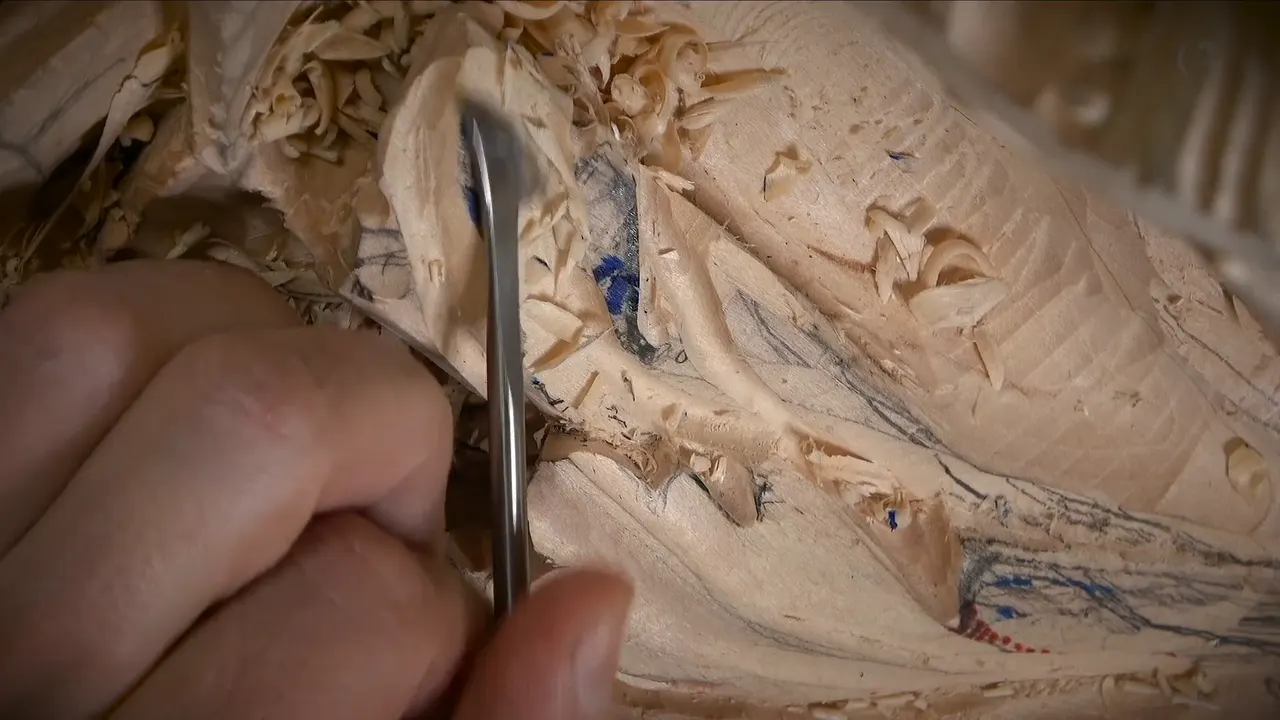

"I apologize for that black screen," I said in part 3 of workshop 72 in the Venice Room. In other lessons I named footage I lost, and then I told you what I had done in the minutes you could not see. The lines are below, with their lessons.
Ever sat down to watch a carving lesson and found the picture gone for a while? Ever wondered what the carver did in the gap? Then you will want the words I used right then. They come from the Venice Room, Furniture Panel and Lily Box courses, plus a few others of mine.
Which words came with the black screen in part 3?
"I don't know what is going on," I said about the black screen. Sometimes my camera, or the recorder, "gives me trouble," I told you, "although I spent thousands of dollars on it."
Gear came next. The true broadcasters and television stations use what I have, I said. Yet "even that really expensive equipment fails."

Switching on the fly helps me a lot, actually. That way I can create a lot more for you to watch, a lot more videos, and "concentrate more on working than editing." I gave a reason too: "Because editing takes a long time, and some of you will understand me if you're familiar with content creation and so on."
Just before the screen went, I was blending with my veiner. Better blending was needed, and my plan was to hit slightly one way and rotate a little bit, "little by little," to clean it a little better.
What was in my hands before the picture went away?
The first words of the part: "It's always a helpful tool." And right after, "Really, really helpful." About one side: "Even if I'm not going to have full convex on this side, I'm okay with that. Nobody's going to know it except you. You're the only one."
The same tool could undercut right away, pretty much, "and remove all that mess and hook out whatever I don't need." Okay, that is good, I said.

Blue marker came up next. "That wasn't too smart idea to use blue marker." For some reason, it "just penetrated so deep. Much deeper than I expected."
In the next area I said I could probably use the same tool and give a convex toward one direction. Maybe a sloping downhill too, because it will still be visible, because of the place where it will be installed.
The blue marker bothered me. Here that was okay, since the carving will be painted, I said. "But in other cases, that would be a huge mistake." After it: "Not huge, huge. I mean, I'm still able to clean it." And: "it is a lesson for me not to use that color." Then I said that would be pipe.

"See, it's a beautiful tool to use. I can blend really, really nicely from deep concave to a much more shallow concave." A ridge came up too: "Not too convenient, but that's okay. It's still possible." A second ridge: "I can actually hit this ridge also pretty much right away."
Facets were the disadvantage I named, for knives and for that tool: it "just leaves so many facets or ridges, if you wish." Ridge makes more sense to me. "Ridges of tool marks or tool marks, whatever."

What did I say when footage was lost in the flower lessons?
Floral and Molding 7, part 1, starts with it: "I lost some of the footage." And: "sometimes it just happens, I guess." My flowers were started and recorded, but "for some reason, that file I found was corrupted." Then: "But let me explain what I've done, okay?"
Two flowers slope in opposite directions. Their holes went in as plug cuts, a number nine, a quarter inch (6.4 millimeters), the tool perpendicular to the slope: "So that was about quarter inch deep cut" (about 6 mm). On the opposite side the slope goes the other way, and I used a different tool, a number nine, 1/8 in (3.2 mm).
Part 1 of workshop 8: "I lost only about maybe about 15 minutes, but I lost some footage." One flower was pretty much done by then, and the second was started. Right there, I would explain it.

On that petal I planned some kind of movement. I was not sure you would be able to see it. So: "Let me try to put a pencil mark for you just to get an idea what I'm doing." I read the mark next: "You can see that curl goes up, then it actually goes back, and then up again." The ridge is raised, and I planned to excavate it.
Size came first in workshop 9, part 3: all around about 3 millimeters (0.12 in), then "One-eighth of an inch" (about 3 mm). Next: "I don't know. Sometimes it happens, and that happened again. I lost about five minutes of my footage. Okay? Please accept my apologies." Then the work: material already excavated right there, and my first concave made.

Workshop 13, part 3: footage went again, and "it's kind of annoying when you're losing stuff." Not much, I said, "but little bit." A correction came: "It wasn't footage, it actually was audio." Next I said I had pretty much created the overall shape of that petal.

How much did the Furniture Panel videos lose?
Workshop 18, part 1, has "approximately five minutes of filming" lost, and "I didn't do a lot." The apology followed. We had finished one side, and I was jumping on that side. I outlined with one of my favorite tools, a number 11, 3 millimeters (about 1/8 in), "really close to the border." Then: "maybe less even." And: "So I did not go too much ahead."

Two minutes of videotaping went in part 12 of that workshop, for some reason. I outlined this section with the knife, and there was not much left to do in the deepest spots. A number 11, 3 mm (0.118 in), followed. And: "I don't know, sometimes my system doesn't work as I wish, but it is what it is, so what can I do?"

Flickering hit workshop 19, part 9: "I apologize if you're going to see some flickering in the image in the video. I don't know what is going on with the cameras today." I noticed it, and I would address it, "but I don't want to stop filming just because of that." Further on I said sorry for the flickering again.
A few minutes of carving were lost in part 10 of the same workshop, and I said: "what I did, essentially, just worked on this leaf. So I didn't do too much." My cameras gave me some trouble that day, for some reason. "But the process was the same."
Five or ten minutes went in workshop 21, part 9: "I lost approximately five, 10 minutes of my work. It's just a video glitch." I removed the background all the way to a seam of one-eighth of an inch (3.2 mm), three millimeters (0.12 in) deep, on both sides. My tool was a 1/16 of an inch (1.6 mm), a millimeter and a half grounding tool, pretty much just for cleaning. "I know it's kind of frustrating for me also when I'm losing some footage, but at least I didn't lose too much."
What stayed turned off in some lessons?
Butterflies workshop 7, part 1: "unfortunately, I lost that footage." Then: "Well, it was not technical problem. It was my stupidity. I forgot to turn on microphone." The good thing: I didn't do it too much. Afterward I described that footage. I worked on those flowers.

The camera was off in other lessons too. In Grape Onlay 5, part 1, my camera had not been on. After that I started to develop a leaf, and it would bulge in the center, I said.

Furniture Panel 29, part 2, has the angle: "I forgot to switch the camera angle." Part of that footage would probably get thrown away. I had two concaves, because I wanted to make sure there was a convex in the middle, and then a number three, the flatter tool, to start blending.

Workshop 33, part 3: my camera was off again, I said, and I did not know why I was turning this off. My preliminary cuts came next, separation cuts, lowered down right away.
Venice 63, part 5: "I'm sorry that you didn't see when I was in this area because the camera, I forgot to turn other camera." Then: "let me also show you in overall development how it looks. And it doesn't look too bad at all." Workshop 68, part 4, brought "Oops, I apologize. You don't see it." and "My bad. Have to switch my cameras more often, and it looks like I didn't." But there was nothing exciting, and I did exactly the same thing.
Which Lily Box and Venice Room videos lost footage?
Lily Box 4, part 8, begins with about 20 minutes of recording of a video lost. On a section I started, I sloped it. I gave it a roundness, like a fillet.
Half an hour of video went in Lily Box 8, part 3, "when I recorded yesterday." Some of it had no picture: "All I had is just the sound. I had to throw that away." I did not go too much, but I went inside with a spoon gouge number 11.

In Lily Box 11, part 2, I said I was "a little frustrated" about the video footage I lost, "although I didn't do too much, but still, I just wish I did not lose it." Then: "Let me check."
A different loss shows up in Venice 70, part 5. I recorded the whole process, "and by the time I was getting ready to edit, I found out that all my footage was really bad." An explanation followed. What you see is a part for the ceiling. I flipped my carving, and it is "just the ghost on a ceiling, somewhere right in the middle." I developed about the same movement that I have right here at this area.

Part 1 of Venice 114 begins with "Oops, I apologize. I lost some of the footage, but anyway, what I did, I just took out the center part." Now I had to redraw that, I said.

Back in the first part of the Venice Room, workshop 4, part 6: "Yeah, I lost a few minutes and got a little bit ahead, but it's okay. Nothing special happened. Just straight down cuts right here."
Why do I leave some carving off the camera?
Off camera has its own line in Floral and Molding 8, part 1: "So let me work on those petals off camera because I don't want to make mileage of footage you're not going to be able to watch." After doing it, I would catch you, and I had to probably just tell you what I was going to do.
Over in workshop 74 I said, in part 3, that I would stop filming at that point. If you want to know how I do those flowers, "just watch Hashemi flowers" in my Hashemi course. My words for it: "too long time of filming and editing."
How do I film my lessons?
Roman Acanthus 16, part 1: "I upgraded my system a little bit." Then: "Please understand that I'm actually using multi-camera setup, and when I'm recording everything and then I'm editing everything, it takes a lot of time. So this time, I upgraded my equipment and I'm going to try to switch right on the fly. So it's going to be live switching." And: "if there are some imperfections or if I'm going to make some mistakes, please forgive me."
Miles of video came up in workshop 55, part 4, when I said I had started one of my courses online, the lion heads. "I do have all the filming done, all the footage. It's like miles and miles and miles of footage." Then: "I just have to find the time to edit all of it."
A big screen TV has its own reason, from workshop 57, part 4: "I was filming for school so many segments." And: "But when I was editing, I found so many spots I would love to change, but it was a little too late, and I wished I could see like you see on a screen." I told myself, "Why don't I just connect myself a big screen TV and just see ahead of the time?"
Which lessons use the word?
| Lesson | What the video lost in that lesson | My words then |
|---|---|---|
| Workshop 72.3 | The picture went black during the lesson | Gives me trouble sometimes |
| Floral 7.1 | Some footage, from a corrupted file | Let me explain |
| Floral 9.3 | Footage for about five minutes, I said | Please accept my apologies |
| Furniture 18.12 | About two minutes of videotaping, I said | But it is what it is |
| Furniture 21.9 | Approximately five, ten minutes of work | It's just a video glitch |
| Butterflies 7.1 | Footage lost, with no microphone turned on | My stupidity, I said |
| Lily Box 8.3 | About 30 minutes of video, some with no picture | Only the sound |
| Venice 70.5 | Footage found really bad when I edited | A ceiling part |
Where can you watch the full videos for each lesson?
Each line above sits in a course on this site. The black screen is in workshop 72 of the Venice Room, and the Venice Room Part 6 course has the whole panel. The lost footage is in Floral course 7, 8, 9 and 13, and in Furniture Panel 18, 21 and 29. See also Plate with Butterflies 7, Lily Box, workshop 8, Venice 70, 114 and Roman Acanthus 16.
How it's done
- Say what was lost. In Floral 8.1 I gave the number, about 15 minutes, and said some footage was gone.
- Say what you did. Furniture 21.9: the background came down on both sides, 3 mm deep, about 0.12 inch.
- Name the tool. After two lost minutes in Furniture 18.12, I named a number 11 at 3 mm, or 0.118 inch.
- Show it with a pencil. Floral 8.1 again: a pencil mark on the petal, so you could see the movement.
- Keep filming. With the picture flickering in Furniture 19.9, I did not want to stop filming over it.
Frequently asked questions
Which words went with the black screen?
My screen went dark in workshop 72, and I said sorry. I did not know what was going on. Trouble with my camera or recorder happens sometimes, I said, even though I spent thousands of dollars on it. Switching on the fly still helps me a lot.
What happened to Furniture Panel 21, part 9?
A video glitch took approximately five or ten minutes of work. Background came out on both sides, three millimeters deep (a bit under an eighth of an inch), and a grounding tool of a millimeter and a half (about 1/16 in) did the cleaning.
How much recording did the Lily Box lesson lose?
About 30 minutes of video went in Lily Box workshop 8, part 3, from the day before. Some of it had no picture, only sound, and I had to throw that away. After that I went inside with a spoon gouge number 11.
What to carve next
- Venice Room workshop 72
- Venice Room Part 6 course
- Floral and Molding, workshop 7
- Floral and Molding, workshop 8
- Floral and Molding, workshop 9
- Floral and Molding, workshop 13
- Furniture Panel, workshop 18
- Furniture Panel, workshop 21
- Furniture Panel, workshop 29
- Plate with Butterflies, workshop 7
- Lily Box, workshop 8
- Venice Room workshop 70
- Venice Room workshop 114
- Roman Acanthus, workshop 16
- Hashemi flowers